Features
Project management
- Welcome screen: recent projects (removable with ×) plus a native folder picker ("Browse your computer…") with a paste-a-path fallback. Open a project from the UI, no path on the command line.
- Project switcher: the header shows the open project's name with a chevron; the dropdown switches to a recent project in place or returns to the welcome screen.
- Starter templates: no project yet? Open a project slides over to a picker that scaffolds a complete DTCG structure from Tailwind CSS v4, Material Design 3, Semantic Functional DS or the Simple Design System (collections, modes and aliases already in place), then opens it and, if you want, jumps straight to the distribution configurator.
Editing tokens
- Variables table: mode columns (light/dark/brand and more), alias chips, inline editing, resizable columns.
- Reorder mode columns: drag a column header by its label to move it. Only the collection's mode order changes (the token files are untouched), and the leftmost mode is the collection's default.
- Sidebar group tree: Finder-style drag-and-drop. Drop a group onto another to nest it, or between two groups to reorder. Multi-select with ⌘/Ctrl-click and Shift-click to move several at once.
- Copy / Cut / Paste variables (Cmd+C / Cmd+X / Cmd+V): cut hides the rows immediately and moves them on paste; copy duplicates.
- Copy / Paste a value (Cmd+C / Cmd+V on a focused cell, or right-click → Copy value / Paste value): the cell value goes to the system clipboard, so it travels to another cell, another mode, or any other app. Pasting into a multi-selection fills every selected row at that mode in one go (one undo).
- Undo / redo (Cmd+Z / Cmd+Shift+Z): byte-exact and server-side.
A pasted value is cleaned up and checked
Clipboard text is normalised (surrounding whitespace, line breaks, quotes and a
trailing ; are dropped) then validated against the cell's type: 1a2b3c pastes as
#1a2b3c, 1600 over 1440px becomes 1600px (it keeps the unit already in use),
and {screen.gutter} re-links the cell to that token. A value that doesn't fit the
type is refused with a reason instead of being written.
Colour palettes (shading)
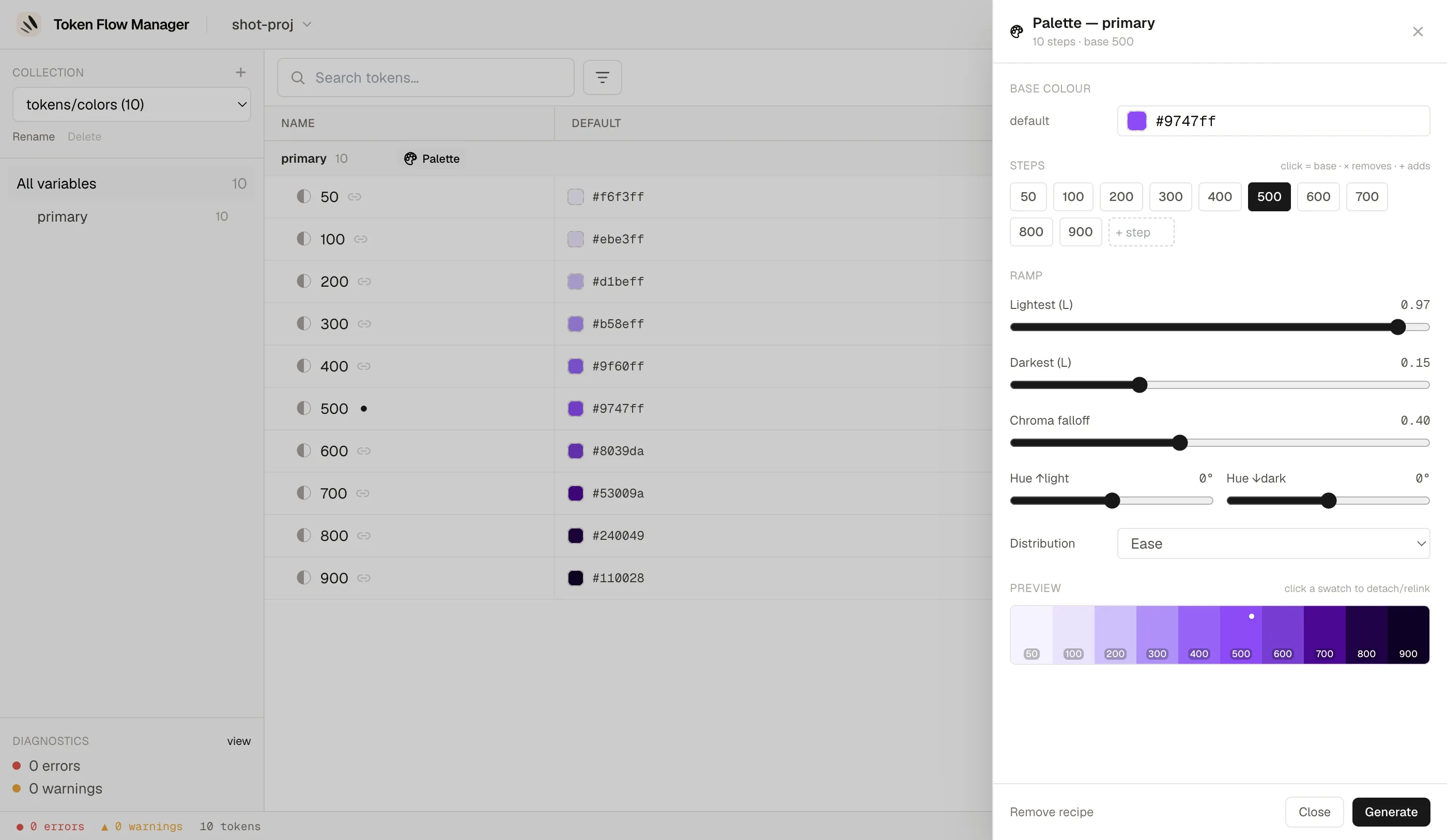
Generate and edit a full shaded scale (50 → 900) from a single base colour — no more copy-pasting each step from an external tool.
Open the palette editor from the palette icon on a colour group's header. It detects
the group's steps, uses 500 as the base (or the middle step), and builds a
perceptually-even OKLCH ramp you tune live:
- Base colour per mode: each mode (light/dark, brands…) has its own anchor, picked with the app's colour picker; each mode's column is generated independently.
- Steps: click a chip to set the base, X to remove a step, or type a name to add one.
- Ramp: lightest / darkest lightness, chroma falloff (desaturation towards the extremes), hue shift, and the lightness distribution (linear / ease / …), with a live preview.
- Generate writes the step tokens; the base keeps its exact colour.
A step you edit by hand becomes detached: it is preserved on regenerate (its preview is frozen too) until you re-link it. In the variables table, a group driven by a recipe shows a Palette badge, the base step a ◆ marker, and generated steps a link icon.
Recipes survive a Figma round-trip
The shading recipe (base, steps, curve) is stored in tokenflow.config.json — a
versioned, tool-only file that is never sent to Figma, so an export can't wipe it
(Figma has no group entity to carry it). The generated steps themselves are ordinary,
portable DTCG colour tokens.
Finding & fixing
- Search (Cmd+S) and filters: aliases, deprecated, orphans, errors, plus a command palette.
- Diagnostics with one-click quick-fixes.
- Inspector with alias chains and incoming references.
- Keyboard shortcuts help (Cmd+/ or ?) and the app version in the footer.
Inspector & extensions
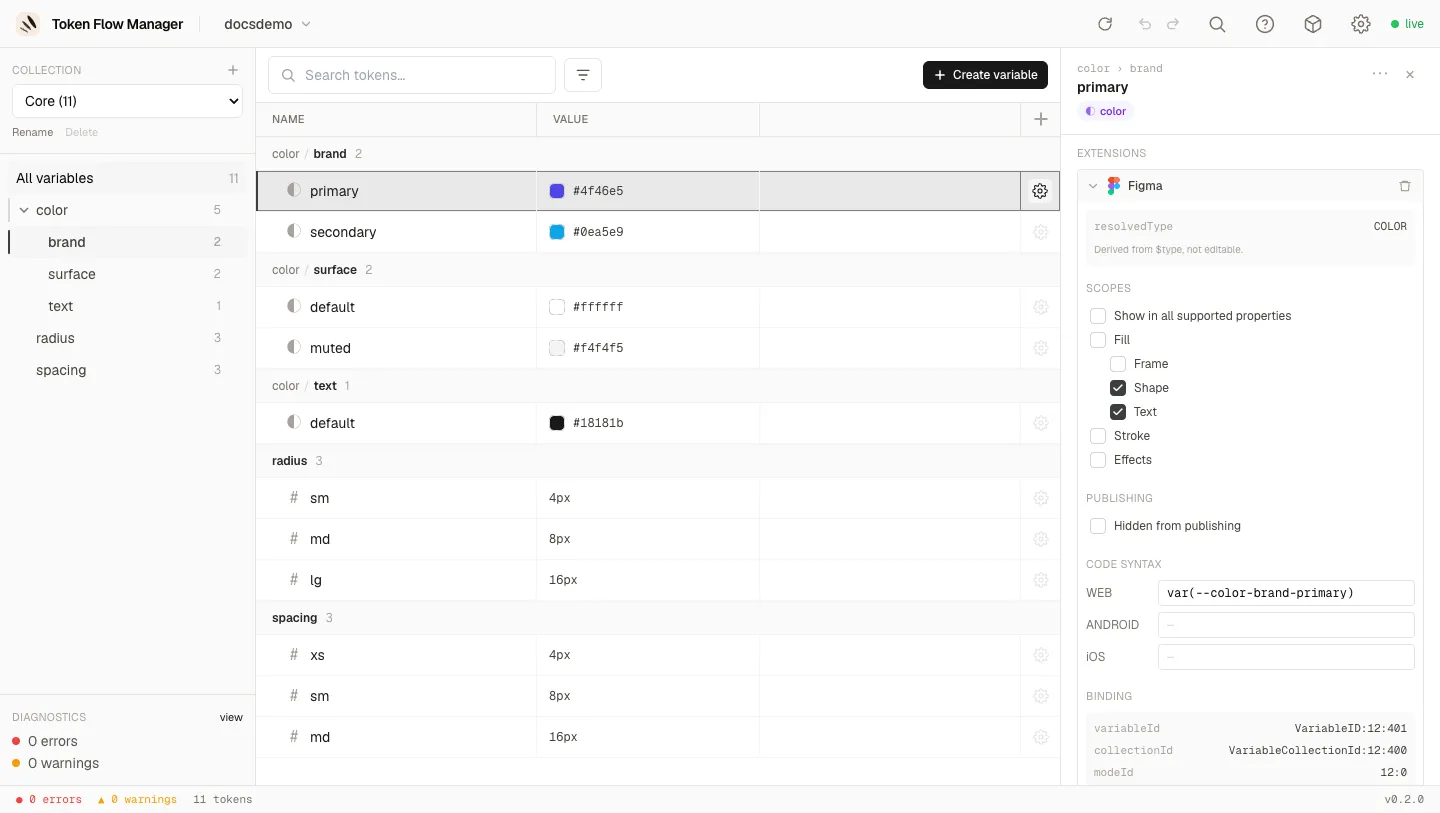
Open a token's detail panel with the gear icon on its row. It shows the description, per-mode values (with resolved colour, OKLCH and gamut), incoming references, rename, and the source file location.
Vendor $extensions are preserved on read and editable. The Extensions section
lists the services attached to the variable as collapsible cards, cumulative and
removable, with the com.figma block (scopes, publishing, code syntax) as the first real
editor. Descriptions and extensions can also be edited across a multi-selection.
Full details on the Bulk edit & extensions page.
Safety model
It never commits
Token Flow Manager edits the source JSON in place, atomically, preserving key order and formatting. The server stays local to your machine, watches files for changes, and keeps rotating backups on write.
- Format-preserving, atomic writes
- Alias resolution across collections and modes (cycles, broken refs detected)
- DTCG 2025.10 compliant
- Local-only, nothing leaves your machine