Distribution
Distribution turns your tokens into real output files (CSS variables, SCSS, TypeScript, JSON). Open it from the package icon in the header.
Since v0.1.4 the assistant is powered by a deterministic resolver (no Style Dictionary
required): its output is identical whatever your input topology - modes nested inside one
file (grey.modeBrand1.900) or one file per mode (primitives.brand1.json) - and
cross-collection references stay as var(--…) in CSS/SCSS (resolved to literal values in
TypeScript/JSON), so brand/theme switching happens at runtime through selectors, with no
duplication.
You get two paths: let the assistant configure the conversion, or link an existing build you already have.
Configure the conversion
Choosing the engine
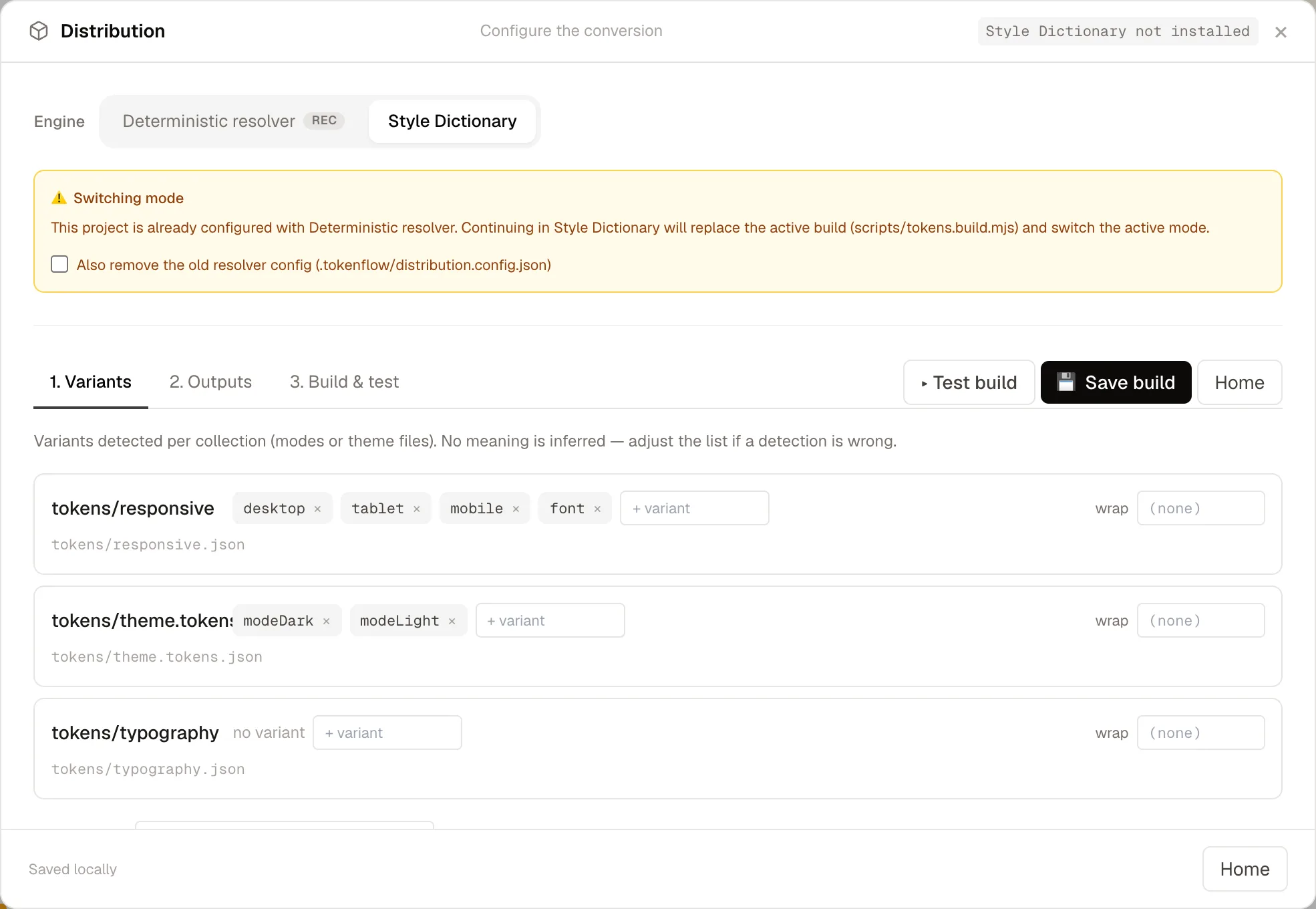
At the top of the configurator an engine selector lets you pick how the build is generated:
- Deterministic resolver (recommended) - the SD-free build described above. It writes a
self-contained
tokens.build.mjswith no runtime dependency. - Style Dictionary - a classic Style Dictionary v5
pipeline (sources × targets × per-source render strategy). The generated
tokens.build.mjsimportsstyle-dictionary, so it is added to yourdevDependencies(runnpm installbefore building). A badge in the header reminds you whether Style Dictionary is installed - it only appears when Style Dictionary is the current context.
A project is configured in one active mode at a time (resolver, Style Dictionary, or a
linked external build). Both managed engines share the same scripts/tokens.build.mjs, so
switching engines replaces the active build. When you pick an engine that differs from
the current mode, a warning banner appears with an opt-in clean-up checkbox that removes
the previous mode's sidecar (and, when leaving Style Dictionary, its style-dictionary
devDependency) so detection stays unambiguous.
The editor has two parts: Outputs (where and in which format) and Collections &
modes (what, and how each mode is written). A sandboxed Test build never touches your
project; Save script writes a self-contained tokens.build.mjs plus an npm script.
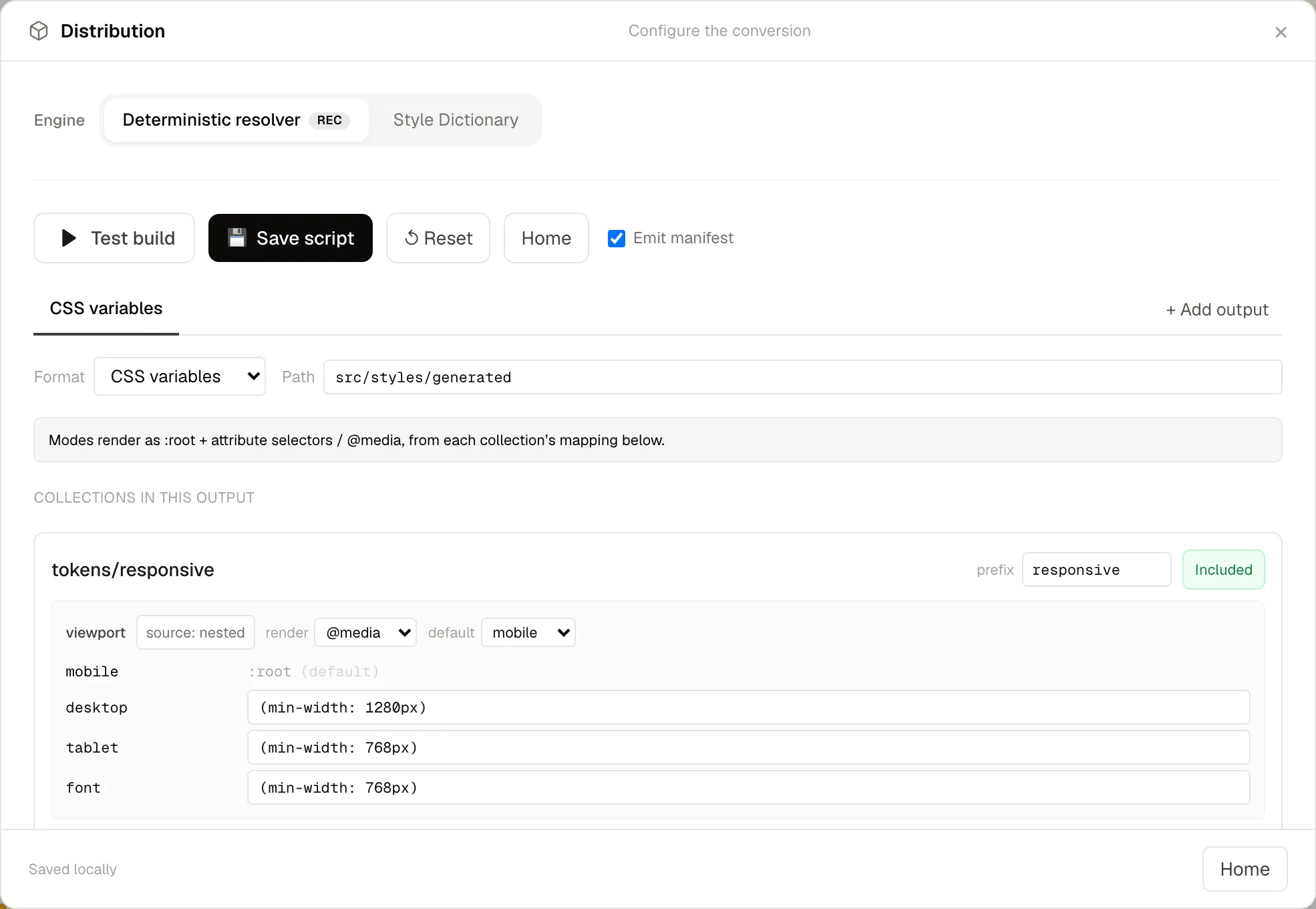
Outputs (tabs)
Each output is one emitter: a format, a destination folder, and the
collections it writes. Add as many as you need - the same tokens can be emitted in
several formats to different folders (for example SCSS to src/styles/generated and
TypeScript to src/app/core/tokens). Each output is a tab; + Add output creates one,
and the format dropdown relabels its tab.
Available formats:
| Format | What it produces |
|---|---|
| CSS variables | Custom properties under :root + attribute selectors / @media (wrap). |
| SCSS variables | Flat $variables (case preserved). No selectors - ideal for breakpoints. |
| SCSS mixin | A $…-themes map + a @mixin emitting CSS variables, with per-brand activation classes. |
| TypeScript | Nested objects, modes as keys; references inlined to literal values. |
| JSON | Nested JSON, modes as keys; references inlined. |
Inside a tab, each collection has an Included / Ignored toggle, so an output emits only
the collections you want (e.g. a flat SCSS variables output just for breakpoints).
Collections & modes
The assistant auto-detects each collection's mode topology (nested path segments vs.
one file per mode) and proposes an editable mode → selector mapping: attribute
selectors for brand/theme, @media for viewport, with a sensible default mode rendered to
:root. This mapping is defined once per collection and every format interprets it:
- CSS variables / SCSS mixin use the selectors / media conditions.
- TypeScript / JSON turn modes into nested object keys.
- SCSS variables (flat) ignore selectors (the default mode wins).
Build & test
Test build runs the conversion in a sandbox and reports diagnostics and the produced
files, grouped by format - nothing is written to your project. Any unresolved reference is
listed as a warning (and emitted as a /* unresolved: … */ comment, never a raw
{token}). Save script writes one partial per collection, an index, and a
tokens.manifest.json into each output destination, plus an npm script - with no
runtime dependencies.
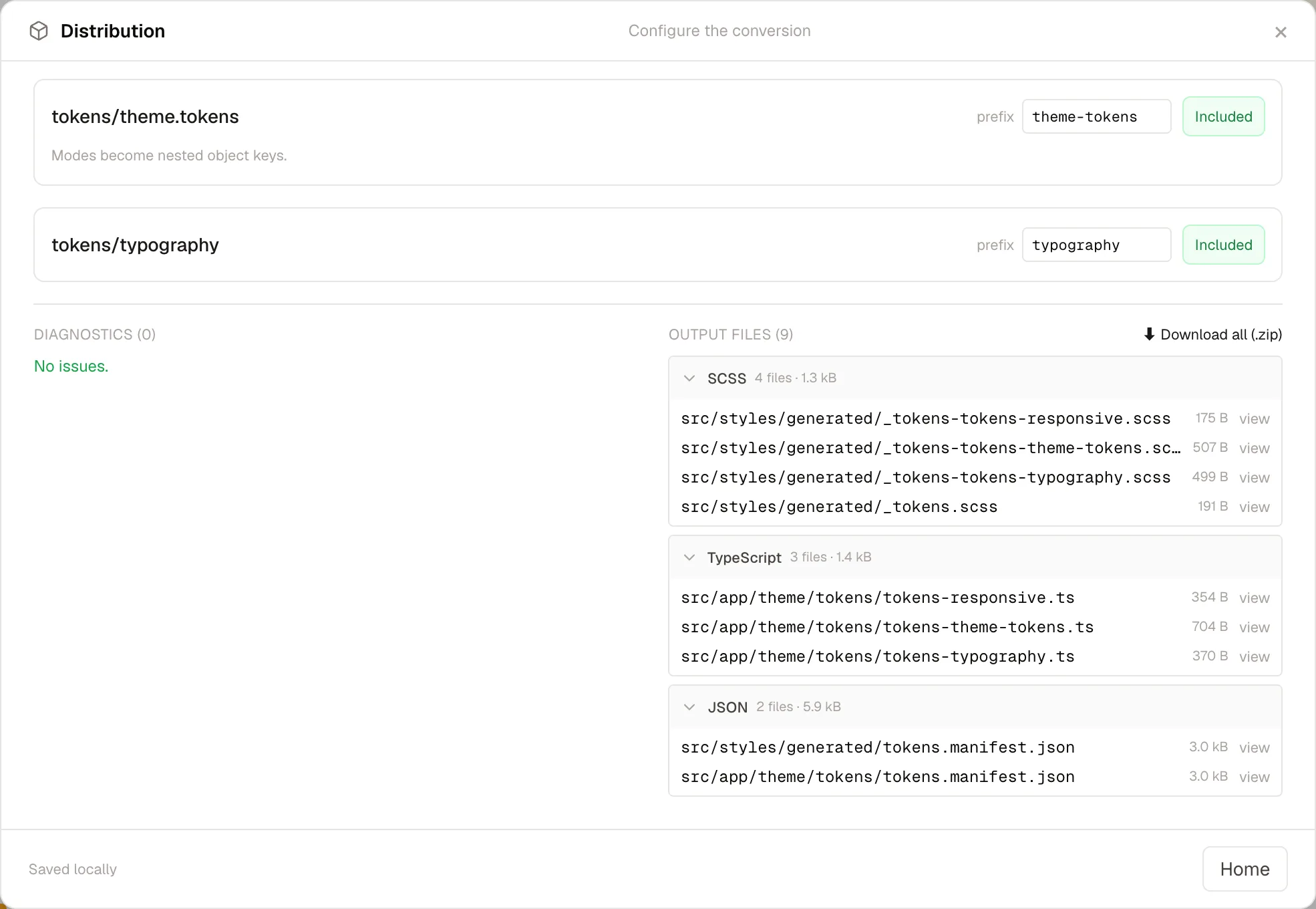
You can also download the result without writing anything: ⬇ .zip on a group, or ⬇ Download all (.zip).
Output examples
A multi-mode color collection emitted as SCSS mixin produces a themes map plus a generator:
$sem-themes: (
  "modeLight": ( "sem-surface-bg": #ffffff, "sem-text-default": #1c1917 ),
  "modeDark":  ( "sem-surface-bg": #0c0a09, "sem-text-default": #fafafa ),
);

@mixin sem-apply($name) {
  $base: map-get(map-get($sem-themes, $name), "modeLight");
  @each $n, $v in $base { --#{$n}: #{$v}; }
}
:root { @include sem-apply("modeLight"); }
The same tokens emitted as TypeScript inline references to literals, with modes as keys:
export const themeTokens = {
  "color": { "surface": { "bg": "#ffffff" }, "text": { "default": "#1c1917" } },
  "modeDark": { "color": { "surface": { "bg": "#0c0a09" } } }
} as const;
Test build vs. real build
Test build runs in a sandbox and never writes to your project. The saved npm script
(e.g. npm run tokens:build) is what actually writes the output files.
Link an existing build
Already have a Style Dictionary (or other) config and build command? Choose I already have my config to point the tool at your config file and build command. Running a linked build executes your real command and writes its output files to disk.
When a TFM-managed build (resolver or Style Dictionary) is already active, linking shows the same switch-mode warning; the external link then takes precedence. Once configured, the overview shows the current active mode with Edit (reopen its wizard), Change mode (pick another engine), and — for a linked build — Unlink.